

23.82. DD 81: Shop Discovery#
- Design status:
Accepted
- Implementation status:
Partial
- DD shepherd:
TBD
- Historical contributors:
Florian Dold
- First published:
2026-01-20
- Last substantive change:
2026-01-20
- Implementation evidence:
exchange(2024-09-12);taler-typescript-core(2025-11-27);taler-android(2026-01-27);taler-ios(2026-03-10)- Normative references:
core/exchange/get-keys.rstandwallet/wallet-core.md
23.82.1. Summary#
This design document specifies a feature provided by wallets that enables users to find shops that accept Taler payments in a particular currency.
23.82.2. Motivation#
After withdrawing money into their Taler wallet, users do not necessarily know many shops that accept Taler payments.
23.82.3. Requirements#
Feature should be easily discoverably by users
Implementation should have minimal complexity
23.82.4. Proposed Solution#
Exchanges provide meta-data that allows wallets to help users discover shops that accept Taler.
In the MVP of this feature, an exchange can publish a single link to a website.
In later iterations, the exchange could also provide more structured data, like map markers (coordinates + description + icon?) that the wallet displays in an aggregated fashion.
As of now (2026-01-20), we’ll only implement the MVP with a single link per exchange, since:
The map would add complexity
Structured data would require a spec and separate exchange APIs
Maps are difficult to provide on mobile platforms in a way that is compatible with software freedoms while at the same not raising the complexity of the app enormously.
23.82.5. Implementation Plan (MVP)#
23.82.5.1. Exchange API#
An exchange can configure one shopping URL that is returned by the /keys response (in the shopping_url field).
23.82.5.2. Wallet-core API#
The response to getBalances already lists all currency scopes with their
balance info. This response is extended with into about the applicable shopping
URLs in the field balances[].shoppingUrls.
When multiple exchanges in a scope offer the same shopping URL, duplicates are filtered
in the shoppingUrls field.
Example response (some fields omitted):
// getBalances response with shopping URLs
{
  "balances": [
    {
      "scopeInfo": {
        "currency": "CHF",
        "type": "global",
      },
      "available": "CHF:5",
      "shoppingUrls": [
        "https://shops.taler-ops.ch/"
      ],
      // [...]
    }
  ]
}
23.82.5.3. Wallet UI#
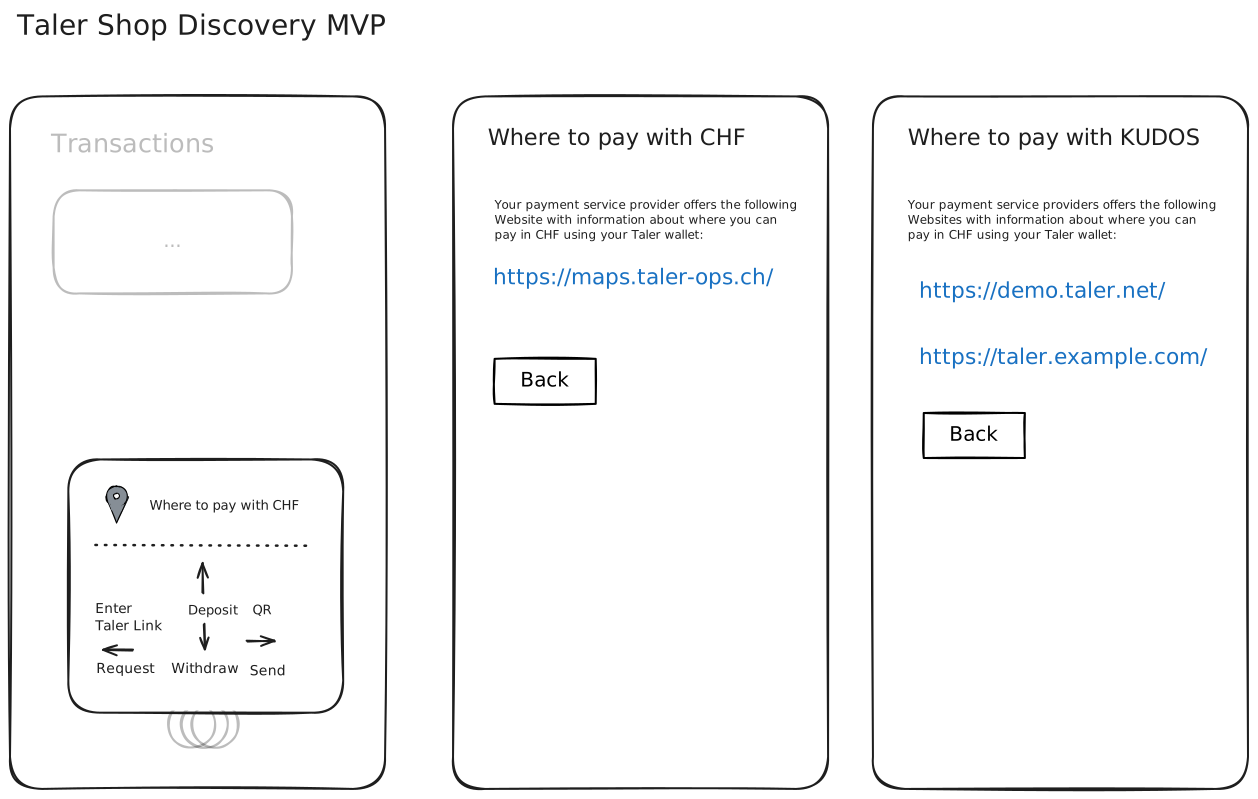
Description:
When the user presses the Taler action button, the menu sheet now displays a new UI element with the label “Where to pay with $CURRENCY”.
TBD: How does this look on the webext where we do not have an action button?
The $CURRENCY is determined by currency (scope) that the user currently has selected.
When there are no shopping URLs available, the UI element is not shown.
TBD: What happens when no currency scope is selected, i.e. the user is on the overview screen?
Alternative A: No extra UI element for shop discovery is shown.
Alternative B: Shop discovery item gets label “Where to pay with Taler”, when tapping/clicking, user first selects currency scope from a list.
When tapping/clicking the shop discovery element, the app shows another page with the available shop discovery link(s).
Alternatives:
The shop discover button could directly lead the user to the
shopping_urlWebsite instead of showing another screen.Incompatible with multiple links
Better to show the URL to the user before they visit it
The “Where to pay with $CURRENCY” could also be displayed in the currency overview with the new Vlada-style design for that view. However, since it’s currently not implemented on any platform, the proposed UI puts the new element in the action button menu.
The “Where to pay with $CURRENCY” could allow the user to select a different currency.
23.82.6. Test Plan#
Deployed exchanges already provide shopping URLs.
A wallet-core dev experiment can be used to override exchange scopes and shopping URLs.
23.82.7. Definition of Done#
[x] Implemented in exchange
[x] Implemented in wallet-core
[x] Consensus on DD
[x] Implemented on Android UI
[x] Implemented on iOS UI
[ ] Implemented on webext UI
[ ] QC session with Android UI
[ ] QC session with iOS UI
[ ] QC session with webext UI
23.82.8. Alternatives#
Structured data / map.
Could happen later, but not for first iteration / MVP.
23.82.9. Drawbacks#
Extra complexity.
23.82.10. Discussion / Q&A#
(This should be filled in with results from discussions on mailing lists / personal communication.)