

23.89. DD 88: Wallet Withdrawal Experience#
- Design status:
Accepted
- Implementation status:
Partial
- DD shepherd:
TBD
- Historical contributors:
Vlada Svirsh
- First published:
2026-03-01
- Last substantive change:
2026-05-03
- Implementation evidence:
taler-android(2026-03-04); no corresponding iOS/WebExtension implementation was established
23.89.1. Summary#
This document describes withdraw flow and experience in wallet. It defines what Android, iOS and WebExtension should follow in order to have a coherent withdrawal experience between platforms.
23.89.2. Motivation#
We want user to have smooth withdrawal experience independent of the platform they are using.
23.89.3. Requirements#
23.89.4. Proposed Solution#
23.89.4.1. Withdraw#
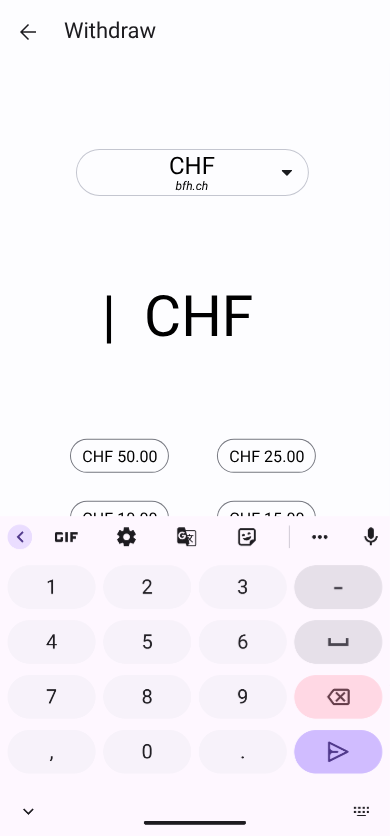
After choosing “Withdraw” action or pressing “Withdraw digital cash” button from “Empty wallet screen”, the user is presented with this screen. The keyboard for amount entry automatically opens. The Withdraw button is disabled until a valid amount is entered. Once a valid amount is provided, the button is enabled and displayed with the primary color.
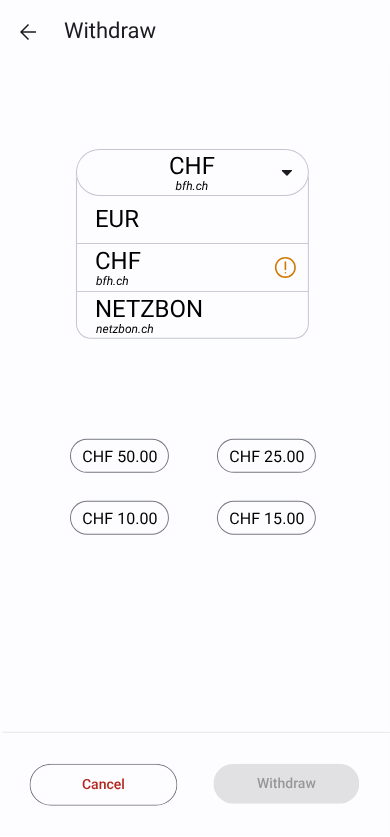
The user can select a currency from a dropdown list. A warning icon appears next to the currency selector; tapping it opens a dialog (see next image). The warning icon uses the warning color from the DD 66: Wallet UI Color Scheme.
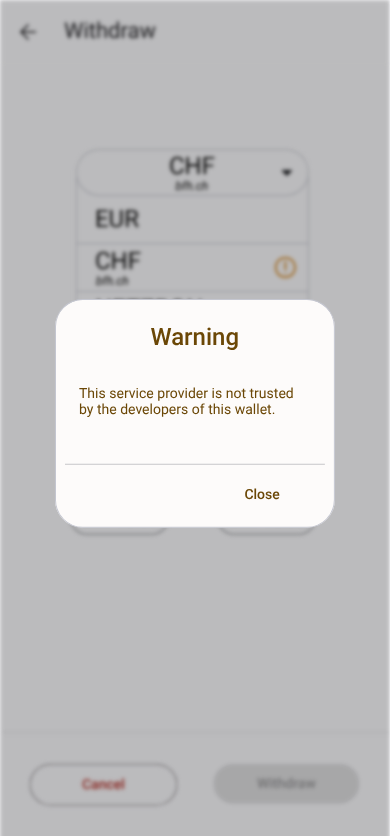
The warning dialog displays the message: “The service provider is not trusted by the developers of this wallet.”
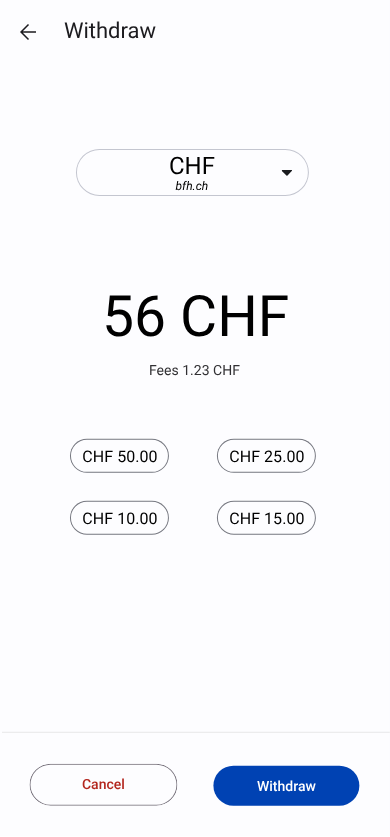
If applicable, fees are displayed below the amount input field. Below the amount section, amount shortcuts defined by the exchange are shown for quick selection.
More details about the prototype are available here: Penpot Prototype
23.89.4.2. Withdraw pending#
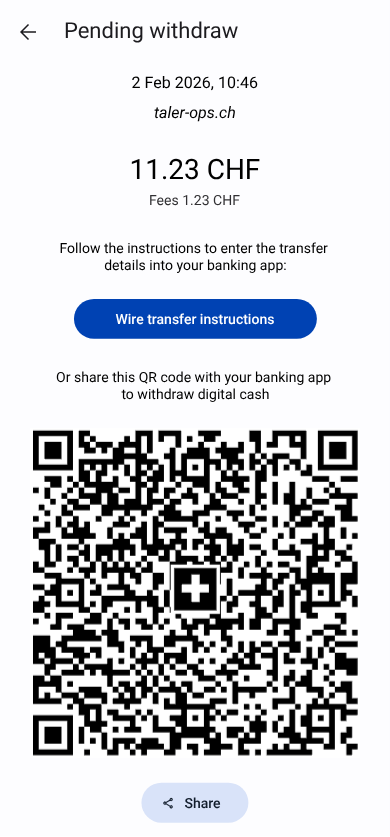
This screen is shown after the user confirms the withdrawal if only 1 QR code available for withdrawal digital cash.
Screen contains:
Header with title “Withdraw pending”
Date of withdrawal
Exchange base_url
Amount
Fees
Text: “Follow the instructions to enter the transfer details into your banking app:”
Primary button “Wire transfers instructions” that opens a screen with instructions for wire transfer (see next image)
Text: “Or share this QR code with your banking app to withdraw digital cash”
Swiss QR code with black and white flag inside
Secondary button “Share” that opens the system share dialog to share the QR code with banking app
23.89.4.3. Wire transfer instructions#
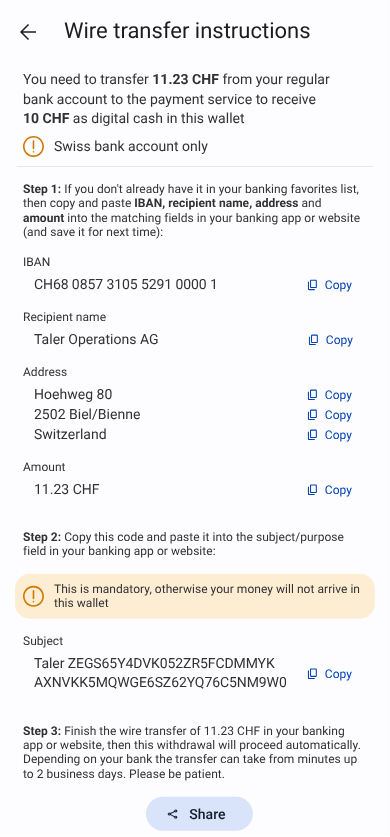
This screen is shown after the user clicks on “Wire transfers instructions” button from “Withdraw pending” screen.
Screen contains:
Header with title “Wire transfer instructions”
Text: “You need to transfer $amount-with-fees from your regular bank account to the payment service to receive $amount as digital cash in this wallet
Warning icon (color warning
#f99c06) and text: “$accepted-countries bank accounts only”Divider
Text: “Step 1: If you don’t already have it in your banking favorites list, then copy and paste IBAN, recipient name, address and amount into the matching fields in your banking app or website (and save it for next time):”
List of details to copy and paste:
IBAN
Recipient name
Address
Amount
Text: “Step 2: Copy this code and paste it into the subject/purpose field in your banking app or website:”
Warning banner (color WarningContainer
#fdedd3, rounding radius 15) with warning icon and text: “This is mandatory, otherwise your money will not arrive in this wallet”Subject to copy and paste
Text: “Step 3: Finish the wire transfer of $amount-with-fees in your banking app or website, then this withdrawal will proceed automatically. Depending on your bank the transfer can take from minutes up to 2 business days. Please be patient.”
Secondary button “Share” that opens the system share dialog to share the wire transfer instructions with the banking app
23.89.5. Test Plan#
(If this DD concerns a new or changed feature, describe how it can be tested.)
23.89.6. Definition of Done#
(Only applicable to design documents that describe a new feature. While the DoD is not satisfied yet, a user-facing feature must be behind a feature flag or dev-mode flag.)
23.89.7. Alternatives#
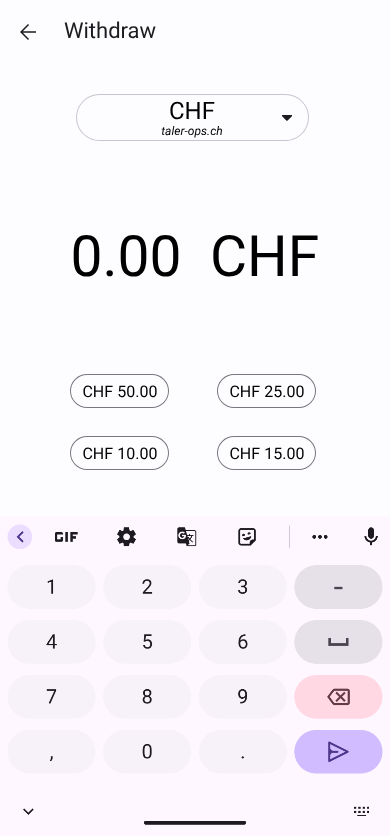
Alternative for input amount to simplify implementing
Higher positioning of elements, so shortcuts are not hiden by keyboard
23.89.8. Drawbacks#
23.89.9. Discussion / Q&A#
(This should be filled in with results from discussions on mailing lists / personal communication.)